고객센터에 사용자가 문의 게시물을 작성하면 관리자에게 디스코드로 알림이 가고, 관리자가 답변을 달아주기 전 AI가 먼저 문의글에 맞게 답변을 달아주는 기능을 구현하려고 한다.
- 디스코드(Discord)를 통해 관리자가 실시간으로 알림을 받음
- AI가 사용자의 문의 내용을 분석해 적절한 초안 답변을 자동으로 작성 (추후엔 미리 학습시킨 내용을 기반으로 응답하게 작업 할 예정)
문제 발생
- OpenAI API(GPT-4)나 Claude API 등 외부 모델도 있지만 비용 문제와 고객센터의 경우 회사 정책을 학습시켜 사용해야 하므로 보안적인 문제가 있어 LLM을 사용하기로 했고, 그중 Ollama를 사용했다.
- 설치와 연동 후 문의 응답이 잘 오는 것을 확인은 했지만 질문을 연속으로 보낼 시 동작되지 않거나 TimeOut 발생

원인 분석
1. 동시에 질문 2개 이상 보내면 한쪽이 멈추거나 둘 다 늦어지는 문제
2. 오류로 인해 문제가 한 번 발생하면 일시 오류에 대한 재시도/FallBack 없이 그대로 실패처리 됨
3. Ollama를 실행 시키고 5분 정도 사용하지 않으면 프로세스에서 내려감
해결책
- LLM 답변의 경우 비동기적으로 처리하며 오류로 응답이 오지 않더라도 자동 재시도 처리를 위해 Resilience4j 도입
- 단 무엇을 “재시도 대상”으로 할지 대상을 확실히 정해야 함
- 재시도: TimeoutException, ConnectException, ReadTimeout, HTTP 429/502/503/504
- 미 재시도: HTTP 4xx(400/401/403/404/422), 프롬프트 검증 실패, 요청 파라미터 에러, 토큰 한도 초과(설정 수정 필요)
장점
- 일시 오류 회복력: 네트워크 끊김, 일시적 과부하(HTTP 429/502/timeout)에서 자동 재시도로 성공 확률 올라감
- 격리와 보호: CircuitBreaker/Bulkhead/RateLimiter로 LLM 호출이 다른 기능을 먹통으로 만드는 걸 차단
단점
- LLM이 느릴 때 재시도까지 몰리면 더 느려짐 → 레이트리밋/큐잉이 필수
- 재시도는 곧 토큰/시간 소모 → 재시도 대상/횟수/백오프를 아주 보수적으로 적용해야 함
Code
의존성 주입
ext {
    springAiVersion = "1.0.3"
}

dependencyManagement {
    imports {
        mavenBom "org.springframework.cloud:spring-cloud-dependencies:2024.0.0"
        mavenBom "org.springframework.ai:spring-ai-bom:$springAiVersion"
    }
}


dependencies {
	implementation "org.springframework.ai:spring-ai-starter-model-ollama"
	implementation "org.springframework.cloud:spring-cloud-starter-circuitbreaker-resilience4j"
}
AiConfig
@Configuration
public class AiConfig {

    @Bean
    public ChatClient chatClient(ChatClient.Builder chatClient) {
        return chatClient
            .defaultSystem("""
                    당신은 고객센터 자동응답 도우미입니다.
                    - 한국어로 간결하고 정중하게 답하세요.
                    - 불명확하면 추가 정보 요청을 한 문장으로 끝에 덧붙이세요.
                    """).build();
    }

}
AsyncConfig (비동기 처리 설정)
@Configuration
@EnableAsync
public class AsyncConfig {

    @Bean(name = "aiExecutor")
    public Executor aiExecutor() {
        ThreadPoolTaskExecutor ex = new ThreadPoolTaskExecutor();
        ex.setCorePoolSize(1);          // AI: 최소 2개
        ex.setMaxPoolSize(2);           // 피크 시 확장
        ex.setQueueCapacity(100);       // 대기열(Queue)에 쌓을 수 있는 작업 개수
        ex.setThreadNamePrefix("ai-");
        ex.setAwaitTerminationSeconds(30); // 앱 종료 시 대기할 시간
        ex.setWaitForTasksToCompleteOnShutdown(true); // 종료 전에 대기할지 여부
        ex.setRejectedExecutionHandler(new ThreadPoolExecutor.CallerRunsPolicy()); // 풀과 큐가 모두 꽉 찼을 때의 동작 정의로
        ex.initialize();                                                           // 새 작업을 처리할 스레드가 없으면 이 작업을 보낸 스레드가 직접 실행한다
        return ex;
    }
 }
application.yml
spring:
  ai:
    retry:
      enabled: false #Spring AI 내부 재시도를 끄고, Resilience4j의 Retry/RateLimiter/CircuitBreaker 조합으로 안정성을 관리
    ollama:
      base-url: http://localhost:11434
      chat:
        options:
          model: qwen2.5:1.5b
          num-gpu: 0
          temperature: 0.2

 resilience4j:
  circuitbreaker:                           # 실패율이 높아지면 회로 OPEN으로 빠르게 차단
    instances:
      ai:
        sliding-window-type: TIME_BASED      # 시간 기준
        sliding-window-size: 120             # 120초(2분) 동안의 통계
        minimum-number-of-calls: 50          # 최소 표본 수
        failure-rate-threshold: 50           # 실패율 50% 넘으면 OPEN
        wait-duration-in-open-state: 30s     # 30초 동안 차단
        permitted-number-of-calls-in-half-open-state: 5
        automatic-transition-from-open-to-half-open-enabled: true
  retry:                                    # 복구 가능 예외에 한해 재시도
    instances:
      ai:
        max-attempts: 3                     # 1+재시도 2
        wait-duration: 500ms
        enable-exponential-backoff: true
        exponential-backoff-multiplier: 2.0
        exponential-max-wait-duration: 5s
        retry-exceptions: # 재시도 대상 예외를 여기서 지정
          - java.io.IOException
          - java.util.concurrent.TimeoutException
          - org.springframework.web.reactive.function.client.WebClientResponseException
          - com.sparta.delivery.inquiry.exception.RetryableAiException # 로컬 모델 프로세스가 죽은 경우, 재시도해도 의미 없음. 즉시 DLQ로 보내는 게 나을 거 같아 넣음
        ignore-exceptions:
          - org.springframework.ai.retry.TransientAiException   # Spring AI가 감싸는 500 예외 전체는 재시도 제외
          - io.github.resilience4j.ratelimiter.RequestNotPermitted # 토큰 부족시 재시도 금지

  ratelimiter:                              # 초당 처리량(허용량)을 제한, 토큰이 없으면 최대 500ms 대기
    instances:
      ai:
        limit-for-period: 10                # 초당 10건
        limit-refresh-period: 1s
        timeout-duration: 500ms   # 토큰이 없으면 최대 500ms 기다렸다가 진행(대기 허용)

        # 호출 1건당 토큰 1개 소비가 되는데 limit-for-period: 10 가 10이니 리필 주기마다 토큰 10개까 채워짐
        # limit-refresh-period: 1s로 도어 매 1초마다 10개 충전된다. 만약 500ms 안에 토큰을 못 받으면 RequestNotPermitted 예외로 실패
ShopService 코드에서 Repository에 저장 후 이벤트를 발생시킴
    // 문의글 생성
    @Transactional
    public void createNewInquiry(long userId, InquiryCreateRequestDto request) {
        User user = userRepository.findById(userId).orElseThrow(() -> new BusinessException(ErrorCode.USER_NOT_FOUND));
        Inquiry inquiry = Inquiry.toInquiry(request, user);
        inquiryRepository.save(inquiry);
        eventPublisher.publishEvent(new InquiryCreateEvent(inquiry, user));
    }
InquiryCreateEvent (이벤트 코드)
@Getter
public class InquiryCreateEvent {
    private final User user;
    private final Inquiry inquiry;

    public InquiryCreateEvent(Inquiry inquiry, User user) {
        this.user = user;
        this.inquiry = inquiry;
    }
}
InquiryAiEventListener (위에서 이벤트가 발생했을 때 동작하는 Listener)
- 비동기 작업을 별도의 쓰레드 풀에서 실행시키기 위해 @Async("aiExecutor") 어노테이션 사용
- 동작하지 않을 경우 Resilience4j의 @Retry 어노테이션으로 일시적 실패 시 자동 재시도를 하게 되며, 모든 시도에도 실패하면 fallbackToDlq() 메서드가 실행되게 된다.
@Component
@RequiredArgsConstructor
@Slf4j
public class InquiryAiEventListener {

    private final AiResponder aiResponder;

    @Async("aiExecutor")
    @TransactionalEventListener(phase = TransactionPhase.AFTER_COMMIT)
    @Retry(name = "ai", fallbackMethod = "fallbackToDlq")
    public void onInquiryCreatedForAi(InquiryCreateEvent event) {
        aiResponder.aiAnswerComment(event.getUser(), event.getInquiry());
    }


    // 재시도 소진 시 DLQ로 폴백 (실패 이벤트 보관소 느낌으로 나중에 수동적으로 재처리 하거나 자동 복구 스케줄러가 일정 간격으로 재시도 가능하게 구현하는 듯)
    private void fallbackToDlq(InquiryCreateEvent event, Throwable cause) {
        aiResponder.sendToDlq(event.getInquiry().getId(), cause);
        log.warn("AI fallback → DLQ. inquiryId={}, cause={}", event.getInquiry().getId(), cause == null ? "unknown" : cause.toString());
    }

}
AiResponder (Ollama에 문의를 보내게 되는 AI 응답 서비스 계층으로 실패 시 sendToDlq() 로직에서 실패 내역을 저장하게 됨)
@Service
@RequiredArgsConstructor
@Slf4j
public class AiResponder {

    private final CommentService commentService;
    private final ChatClient chatClient;

    public void aiAnswerComment(User user, Inquiry inquiry) {
        String answer = chatClient
            .prompt()
            .user(inquiry.getContent())
            .call()
            .content();

        if (answer == null || answer.isBlank()) {
            throw new RetryableAiException("Blank content from LLM");
        }
        commentService.saveAiComment(answer, user, inquiry);
    }

    // 폴백에서 호출
    public void sendToDlq(UUID inquiryId, Throwable cause) {

        // TODO: DLQ 테이블 작성
        log.error("[AI-DLQ] inquiryId={}, cause={}", inquiryId, cause == null ? "unknown" : cause.toString());
    }
}
Ollama 설치 & 실행
# Ollama 설치
curl -fsSL https://ollama.com/install.sh | sh


# 모델 다운로드
ollama pull qwen2.5:1.5b


# Ollama 서버를 백그라운드로 실행
nohup ollama serve > ollama.log 2>&1 &
*추가 설정*
Ollama를 설치한 서버에서 추가 설정을 하지 않으면 동작하던 Ollama가 대략 5분에서 10분 후 프로세스에서 내려가는 문제 발생
sudo nano /etc/systemd/system/ollama.service 에서 systemd 유닛 파일 수정 필요
- User와 Group 부분에 user는 본인 계정명으로 바꾸면 되고, 48시간 동안 요청이 없어도 메모리에서 내려가지 않게 설정한 상태
[Unit]
Description=Ollama Service
After=network-online.target
Wants=network-online.target

[Service]
Type=simple
User=user
Group=user
WorkingDirectory=/home/user
ExecStart=/usr/local/bin/ollama serve
Restart=always
RestartSec=2
Environment=OLLAMA_KEEP_ALIVE=48h
Environment="PATH=/usr/local/sbin:/usr/local/bin:/usr/sbin:/usr/bin"

[Install]
WantedBy=multi-user.target
저장 후 재시작
# 서버 부팅 시 자동 시작 등록
sudo systemctl enable ollama


# 서비스 즉시 시작
sudo systemctl start ollama


# 서비스가 잘 뜨는지 확인하는 명령
sudo systemctl status ollama

# 또는 프로세스 보기
ps -ef | grep ollama
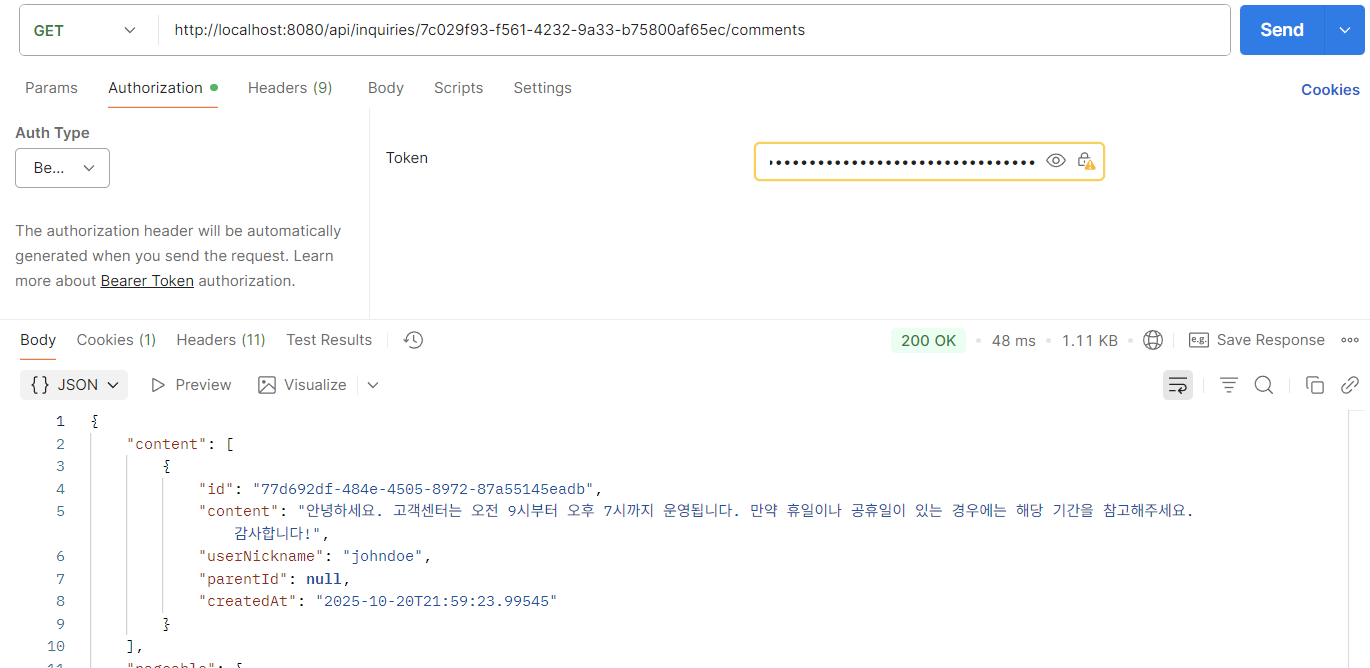
결과


'Spring Boot > LLM' 카테고리의 다른 글
| PGVector Window 설치 방법 (0) | 2026.04.07 |
|---|---|
| RAG 구현 전 Vector DB 선택 (PGVector VS Qdrant 중 무엇이 좋을까?) (0) | 2026.04.07 |
| LLM (Ollama) + Resilience4j 재시도 처리 (Spring Boot) (0) | 2025.11.16 |